How to play
- Blocks fall from the top one at a time. Tap the board or the turn button to turn a block.
- Drag sideways or use the arrow buttons to move it, and drag down to bring it down faster.
- Flick down or press the double-arrow button to drop it straight to the bottom.
- Fill a row from side to side to clear it. The game ends when the blocks reach the top.
Play Block Drop free online. Move and turn falling blocks to fill rows and clear them before the stack reaches the top. Works on phone and desktop.
About Block Drop
Block Drop is a falling-blocks puzzle. Shapes made of four squares drop into a well one at a time. While each one falls, you slide it left or right and turn it so that it fits neatly into the pile below. When a row is filled from wall to wall, it disappears and everything above it moves down. Leave gaps and the pile grows, and the game ends when the blocks reach the top.
Falling-block puzzles have been popular since the 1980s and are still played by millions, because the rules take seconds to learn and the game keeps getting faster. Block Drop is our own version for Gamesupa, with its own look and controls made for phones.
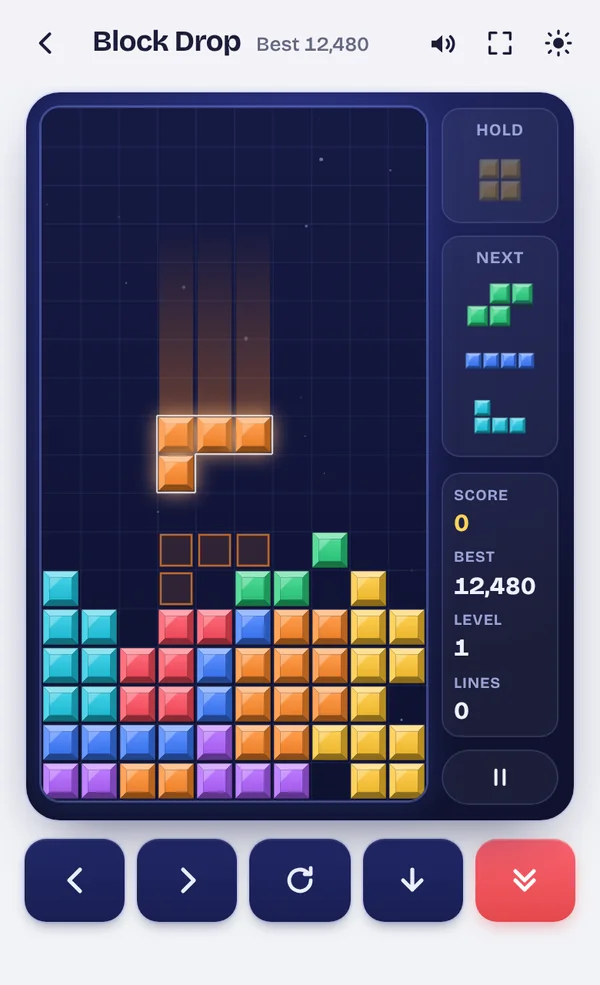
Block Drop on Gamesupa
There are seven different shapes, and they come in a fair order: you always see all seven before any one repeats. The three blocks coming next are shown beside the board, and a faint outline at the bottom shows exactly where the current block will land.
- On a phone: tap the board to turn the block, drag sideways to move it, drag down to bring it down faster and flick down to drop it. The five buttons under the board do the same if you prefer buttons.
- On a computer: the arrow keys move and turn, Z turns the other way, Space drops and C holds.
- Hold: tap the Hold box to keep a block for later and bring it back when it fits better. You can hold once per block.
When a block lands, you still have half a second to slide or turn it before it locks, so you can tuck it under an overhang. Blocks turn naturally against walls and other blocks, nudging sideways or up if they need room. The game pauses and saves if you switch apps, and your best score stays on your device.
Scoring
Clearing 1, 2, 3 or 4 rows with one block scores 100, 300, 500 or 800 points, multiplied by your level. Clearing rows with several blocks in a row adds a bonus, and two four-row clears in a row are worth one and a half times as much. Dropping a block gives 2 points per row it falls and moving it down gives 1. Every 10 rows cleared, the level goes up and the blocks fall faster.
Quick tips
- Keep the pile flat. A flat surface has a place for every shape. Tall towers and deep pits do not.
- Avoid covered gaps. A hole with blocks on top of it is hard to clear. If you must leave one, leave it at the edge.
- Leave one column open for the long block. When the long straight block arrives, you can clear four rows at once for the biggest score.
- Look at the next blocks. Plan where the next one will go before you place the current one.
- Use Hold to save a long block for the moment your open column is ready.
Learn more in Block Drop tips: how to clear more lines.
Block Drop questions
How do I play Block Drop on a phone?
Tap the board to turn the falling block, drag left or right to move it, drag down to bring it down faster and flick down to drop it. The buttons under the board do the same things if you prefer them.
What are the keyboard controls?
Left and right arrows move, the up arrow or X turns clockwise, Z turns the other way, the down arrow moves down, Space drops the block and C holds it. P pauses the game.
What does Hold do?
Tap the Hold box to keep the current block for later and take the next one. You can swap it back in on a later turn. You can hold once per block.
How is the score counted?
Clearing 1, 2, 3 or 4 rows at once scores 100, 300, 500 or 800 points, times your level. Clearing rows on several blocks in a row adds a bonus, and dropping blocks gives a few extra points.
Does the game get faster?
Yes. Every 10 rows you clear, the level goes up and blocks fall faster. Your best score is saved on your device.
Is my game saved if I close the page?
Yes. The game pauses and saves when you leave or switch apps, and offers to continue when you come back.